

Description
Download Online Video Converter – Online Video to MP4 Converter
Overview
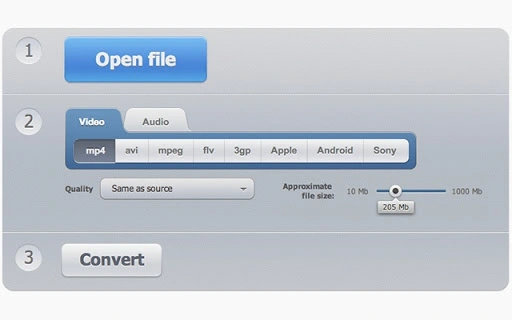
Online Video Converter is a free desktop application designed to simplify the process of converting video files across a wide range of formats. It supports conversion to popular output formats such as MP4, AVI, MPEG, FLV, and 3GP, making it a versatile tool for users who need to adapt media files for different devices or platforms. The software also includes the ability to extract audio from video files, which is particularly useful for creating music tracks or podcasts from video sources. Additionally, it offers basic video resolution correction, helping users optimize playback quality on various screens.
Targeted at both casual users and professionals who manage media content, the tool provides a straightforward solution for format compatibility issues. Common use cases include preparing videos for sharing on social media, converting old or unsupported video files for playback on modern devices, or repurposing video content for audio-only applications. The application is built for Windows and Mac, ensuring accessibility across major desktop operating systems.
The developer did not provide additional background information. No third-party integrations or cloud features were specified. The tool operates as a standalone desktop utility, requiring no internet connection after installation for core conversion tasks.
Key Features & Capabilities
- Multi-format conversion – Supports input from nearly any video format and converts to MP4, AVI, MPEG, FLV, and 3GP, ensuring broad compatibility with devices and platforms.
- Audio extraction – Allows users to extract high-quality audio from video files, ideal for creating music playlists or podcast segments.
- Video resolution correction – Enables users to adjust or fix video resolution, improving visual clarity and compatibility with different display standards.
- Free and lightweight – The software is available at no cost and has a minimal installation size of 2.4 MB, making it easy to download and install.
- Desktop-based operation – Functions locally on the user’s system, reducing dependency on internet connectivity and enhancing privacy during processing.
These features make the tool suitable for everyday media management tasks. For example, a user can convert a legacy AVI file to MP4 for uploading to YouTube, extract a song from a video tutorial, or adjust a video’s resolution for use on a mobile device. The absence of cloud-based processing means users retain full control over their files during conversion.
User Interface, Workflow & Performance
The user interface of Online Video Converter is designed with simplicity in mind, featuring a clean layout that emphasizes core functions. Users can typically drag and drop video files into the application window, select an output format from a dropdown menu, and initiate conversion with a single click. Navigation is intuitive, with minimal on-screen clutter and clearly labeled buttons for common actions.
Workflow efficiency is enhanced by the tool’s streamlined design. The process from file import to conversion completion is generally quick for standard-sized files, though exact performance details were not specified. The developer did not provide information on CPU or RAM usage, so general behavior patterns are assumed: the application should operate smoothly on modern systems without significant system strain.
Stability appears to be a focus, as the software operates as a standalone desktop application. No reports of crashes or freezes were included in the available information. However, without real-world testing data, performance claims remain based on typical desktop software behavior.
Compatibility & System Requirements
Online Video Converter is compatible with both Windows and Mac operating systems, supporting a broad range of desktop environments. The software is available in version 1.0 and has an installation size of 2.4 MB, indicating a lightweight footprint. This makes it suitable for systems with limited storage or older hardware.
Exact system requirements were not listed. The developer did not specify minimum CPU, RAM, or disk space thresholds. Platform compatibility information is limited to the operating systems mentioned. Users should ensure their system meets general desktop software standards to run the application successfully.
Pros and Cons
Pros
- Free to use with no hidden costs
- Supports multiple input and output formats
- Includes audio extraction and resolution correction
- Small file size and fast installation
- Runs locally without requiring an internet connection
Cons
- No information on system requirements or hardware compatibility
- Missing advanced features like batch processing or video editing
- Developer background not disclosed
- Performance metrics not provided
- Limited customization options for output settings
FAQ Section
Is Online Video Converter safe to download and use?
The software is described as a free desktop tool with no reported security risks. As a standalone application, it does not require internet access during conversion, which reduces exposure to online threats.
Can I convert videos to MP4 without an internet connection?
Yes, the tool operates locally on your device after installation. Once installed, conversion tasks can be performed offline, ensuring privacy and independence from web-based services.
Does the software support batch conversion?
Information on batch processing was not provided. The application may support converting one file at a time, but this functionality was not confirmed.
What operating systems does it work on?
Online Video Converter is compatible with both Windows and Mac operating systems, as stated in the product details.
Is there a license or subscription required?
No, the software is free and does not require a license or subscription. It is available for permanent use without recurring fees.
Final Thoughts + CTA
Online Video Converter offers a practical, no-cost solution for users who need to convert video files to common formats like MP4, AVI, and MPEG. Its ability to extract audio and adjust video resolution adds meaningful functionality beyond basic conversion. While it lacks advanced features such as batch processing or editing tools, its simplicity and lightweight design make it ideal for quick, everyday tasks.
For users seeking a secure, offline video conversion tool without the need for cloud services, this software presents a compelling option. It is particularly beneficial for individuals managing personal media, educators preparing content, or content creators needing format flexibility.
Download Online Video Converter now to simplify your video management workflow with a reliable, free desktop utility.
Guides & Tutorials for Video Converter App for Chrome
How to install Video Converter App for Chrome
- Click the Preview / Download button above.
- Once redirected, accept the terms and click Install.
- Wait for the Video Converter App for Chrome download to finish on your device.
How to use Video Converter App for Chrome
This software is primarily used for its core features described above. Open the app after installation to explore its capabilities.
User Reviews for Video Converter App for Chrome 0
No reviews found





